One booking, start to finish.
Mioryde connects people who need goods moved with independent partners who own the vehicles. You book in the app; the partner is checked before their first job; two codes mark the handover at each end.
The Mioryde app is on Google Play for Android. Open the Google Play page. The iPhone app is coming soon.
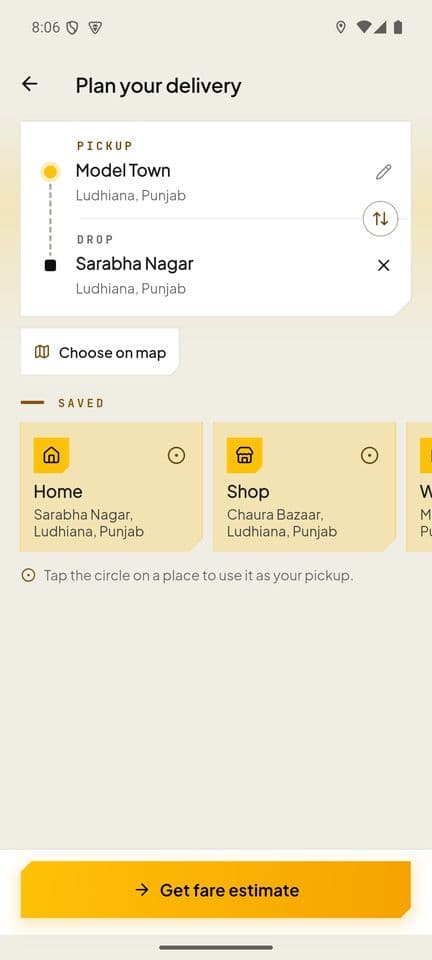
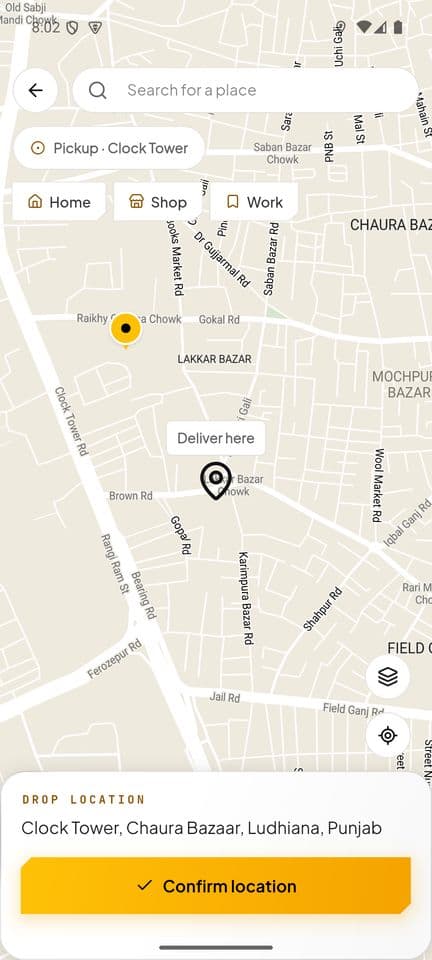
Set the route
Pick the pickup and the drop on the map. The app plans the road route and measures the distance.
- Search for a place, tap a saved place such as Home, Shop or Work, or choose a point on the map.
- The distance the app measures is the one the fare uses, with the rate card of the vehicle you choose next.
- Mioryde moves goods within a city, so pickup and drop are both in a place we have a service area for.
Nothing is booked at this point. You can change either end before you confirm.
Where we workChoose a vehicle
A two-wheeler, an 8ft truck or a mini truck, matched to what you describe.
- The app asks what you are sending, so the vehicle fits the load.
- Each vehicle has its own rate card for your city, so the fare is worked out for the vehicle you choose.
The three vehicles
- Two-wheeler
- Up to 20 kg. Documents, tiffins, small parcels, spare parts, samples.
- 8ft truck
- Up to 750 kg. Furniture, appliances, cartons of shop stock, a few sacks.
- Mini truck
- Up to 1.5 tonnes. House shifting, pallets, heavy commercial loads.
Capacity is the most a vehicle may carry. A load over it needs the next size up.
See the vehiclesSay what you are sending
Choose a category, add one to four photos of the goods and declare them. The photos stay with the order.
- The photos stay with the order, so the goods are on record from the start. They are also what you attach if you ever report damage.
- Declare the value accurately. Cover for loss or damage is limited to the amount shown in the app at booking or the declared value, whichever is lower.
Some goods cannot be carried: illegal goods, flammables, explosives, weapons, live animals, and perishables without proper packaging.
The full list of prohibited itemsCheck the fare, then confirm
The fare is shown line by line. It is held for a short time; if it lapses you are quoted again before anything is booked.
- The distance on the fare is the one measured in step 1, on the route the app planned.
- Pay online, from your Mioryde wallet, or in cash to the partner on delivery where that option is offered.
The lines on a fare
- Base fare
- Set per vehicle on the rate card for your city.
- Distance
- Charged per kilometre on the route the app plans, shown with the km.
- Time
- Only on rate cards that charge for time.
- Peak demand
- Added when demand is high, named on the bill with its multiplier. Never hidden in the base.
- Minimum fare
- Tops up a very short trip to the vehicle's minimum.
- Coupon
- Comes off before tax. It can never take the fare below the minimum.
- GST
- At the rate the rate card charges, shown as a percentage.
After booking, the fare can change only if the job does: waiting beyond the free period shown in the app, tolls, parking, an extra stop or a changed destination. Cancelling before a partner accepts is free; after that a fee may apply, and the app shows it before you confirm the cancellation.
How a fare is worked outFollow the partner
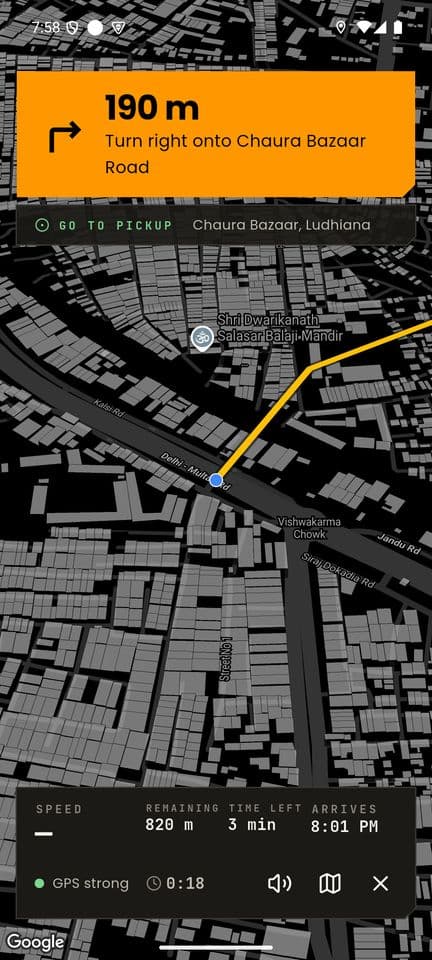
An independent partner with the right vehicle accepts. You get a pickup code and can watch them on the map. Send the tracking link to the receiver if you like.
- Nearby partners with the right vehicle are offered the job, and the first to accept gets it.
- How quickly someone accepts depends on how many partners have joined in your city.
- The tracking link opens a page in any browser. Whoever holds the link can see the delivery, so share it with the receiver only.
Partners are independent, not Mioryde employees, and each is checked before their first job.
What protects a bookingHand over with a code
The partner collects with your pickup code and finishes the drop with the receiver's delivery code. A GST invoice follows.
- Without the pickup code the partner cannot collect, and without the delivery code the drop cannot be completed.
- Every completed trip gets a GST invoice. Add E-way bill details for a consignment that needs one.
Two codes mark the handover
- Pickup code
- You give it to the partner. They need it to collect the goods.
- Delivery code
- The receiver gives it to the partner. It completes the drop.
If goods arrive damaged, open the delivery in the app and choose Help, with a photo. Report loss or damage within 48 hours, with photographs and the delivery code. A person reviews every claim.
Cancellations, refunds and claims
Sign up with your phone number
A code is sent by SMS. Add your name, your city and the vehicle you drive.
- Install the Mioryde Partner app from Google Play.
- The vehicle you add decides which jobs you are offered: a two-wheeler, an 8ft truck or a mini truck.
You must hold a driving licence valid for the vehicle, and the vehicle must carry current registration and insurance (and a commercial permit where it needs one).
For partnersAdd your documents
The list is on the partners page. Where a government record can confirm a paper, you type a number instead of taking photos.
- Your vehicle plate is looked up first; photos are asked for only what the record does not return.
- You obtain the police verification certificate from your local police and upload it. It carries an expiry date.
Three sets of papers
- About you
- Profile photo and a selfie, Driving licence, Aadhaar, PAN, Police verification certificate.
- About your vehicle
- Registration certificate (RC), Insurance, Commercial permit, Fitness / PUC certificate.
- Money and terms
- Bank account, Partner agreement.
Papers expire. The app warns you at 30, 7 and 1 days before one lapses.
What you will needPeople check them
Each identity paper is checked by two different reviewers. A person decides; nothing is rejected by a machine.
- A record on a police certificate does not by itself mean you are declined; a person reads it.
- The app shows you where you are in the approval.
How these documents are handled and kept is set out in the Privacy Policy.
Privacy PolicyAccept the agreement and link your bank account
You read the partner agreement in the app. Your bank account is verified before any payout.
- The agreement sets out earnings, rates and payout terms. Read it before you accept.
- The bank account must be in your name, and any change to it is verified again.
Cash you collect from customers belongs to the platform. It is netted against what you can withdraw, and there is a limit on how much you can hold.
Go on duty
Once approved and given a working area, you switch on duty. Nearby jobs are offered to a few partners at once, and the first to accept gets the job.
- Approval needs every personal paper approved, an approved vehicle and a working area.
- You decide when to go on duty. Nobody is assigned a job they did not accept.
A lapsed licence or insurance takes you off duty until it is renewed.
Ask about joining
What each vehicle carries is on the vehicles section, what the fare is made of is on the pricing page, and what protects a booking is on the safety page.